EasyVisit visitor management software

Visitor management for every gate, host and guard.

EasyVisit replaces the paper visitor book at estates, office parks and logistics sites. Hosts pre-book visits (or approve walk-ins where enabled), guards check people in, hosts are alerted, and every visit stays on record.

Host pre-booking Fast gate check-in SMS host alerts Visit audit trail
dashboard.easyvisit.app
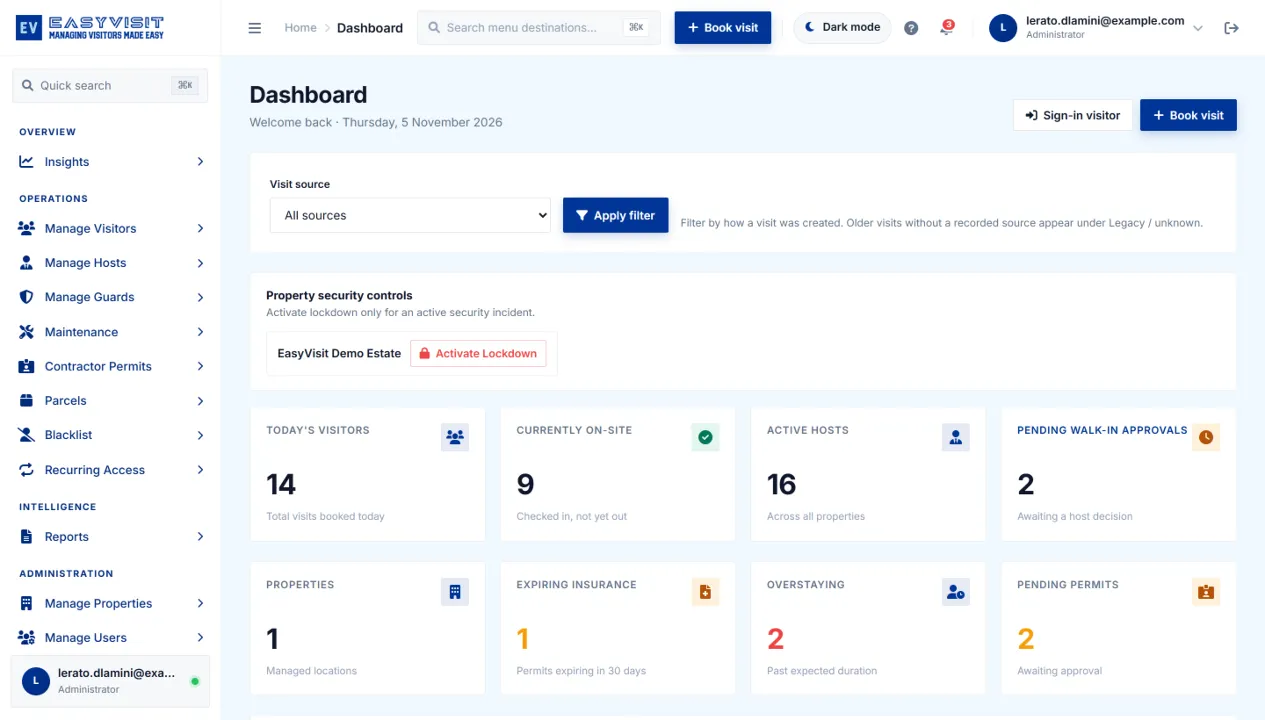
EasyVisit Dashboard home with today's visitors, people on site and pending approvals
New visitor at gate
Daniel Mokoena · Unit 14 · 14:22
3
Portals: host, guard and kiosk
0
Apps to install
12 mo
Record retention, then auto-delete
R899
From, per property per month
Why EasyVisit

The visitor book was never built for security.

Paper logs and intercom calls leave gaps that only show when something goes wrong: an incident, an audit or an evacuation.

Without EasyVisit
With EasyVisit
Paper logbooks get lost, are hard to read and are easy to fake.
Every visit is timestamped and searchable, kept for 12 months, then deleted automatically.
Visitors queue at the boom gate while the guard phones the host.
Pre-booked visitors arrive with an SMS code and, where walk-ins are enabled, hosts approve them from their phone.
In an emergency, nobody knows who is still on site.
A live on-site list, an instant emergency roster and one-tap lockdown.
Overstays, lapsed contractor insurance and uncollected parcels go unnoticed.
Overstay alerts, permit expiry warnings and an SMS to the resident when a parcel arrives.
The check-in journey

From gate to host in seconds.

Hosts can pre-book a visit or approve a walk-in request. Walk-ins are enabled per property and require host approval before an access code is issued.

01 Host approval

Book or request a visit

Pre-book with your host, or request approval through the property's QR code or a guard.

02 Instant

Visitor gets an SMS code

A random 6-character access code arrives on the visitor's phone.

03 Guard or kiosk

Check in at the gate

The code is checked and the visitor screened against your watchlist.

04 Real-time

Host alerted instantly

The host gets an SMS and the dashboard updates live.

Dashboard

A command centre for your whole estate.

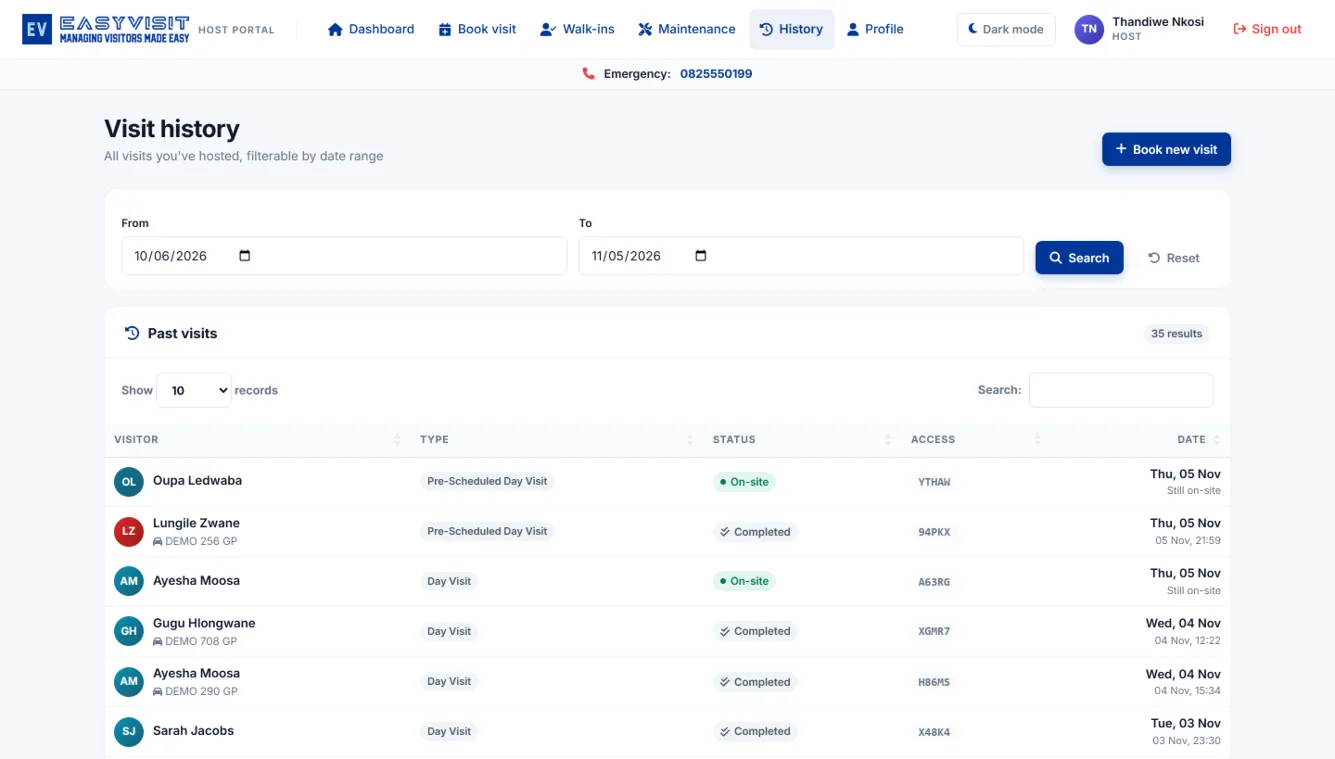
Real-time visitor activity across every gate, live watchlist screening, built-in analytics and incident review by visitor, host, vehicle or code.

Live activity

Every entry and exit, timestamped.

Built-in analytics

Peak hours, visit purpose and no-shows.

Watchlist screening

Silent and real-time, on every check-in.

Audit exports

Visit history to CSV or Excel.

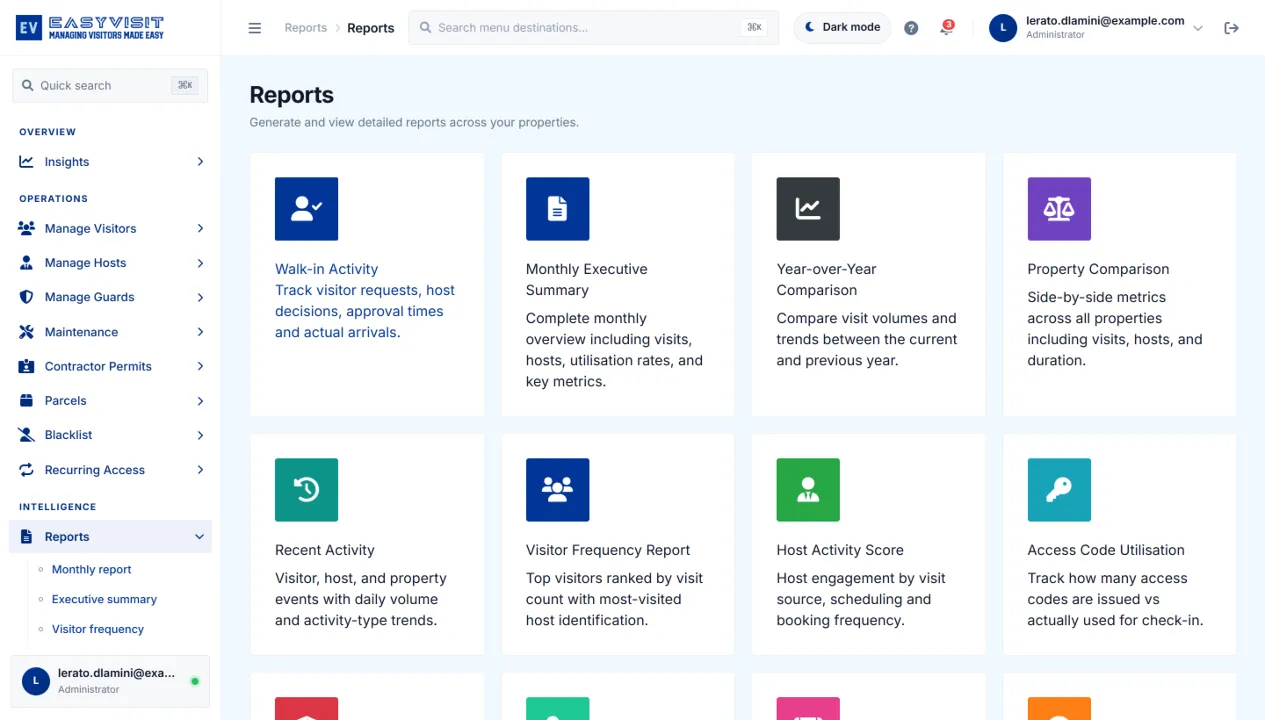
dashboard.easyvisit.app/insights
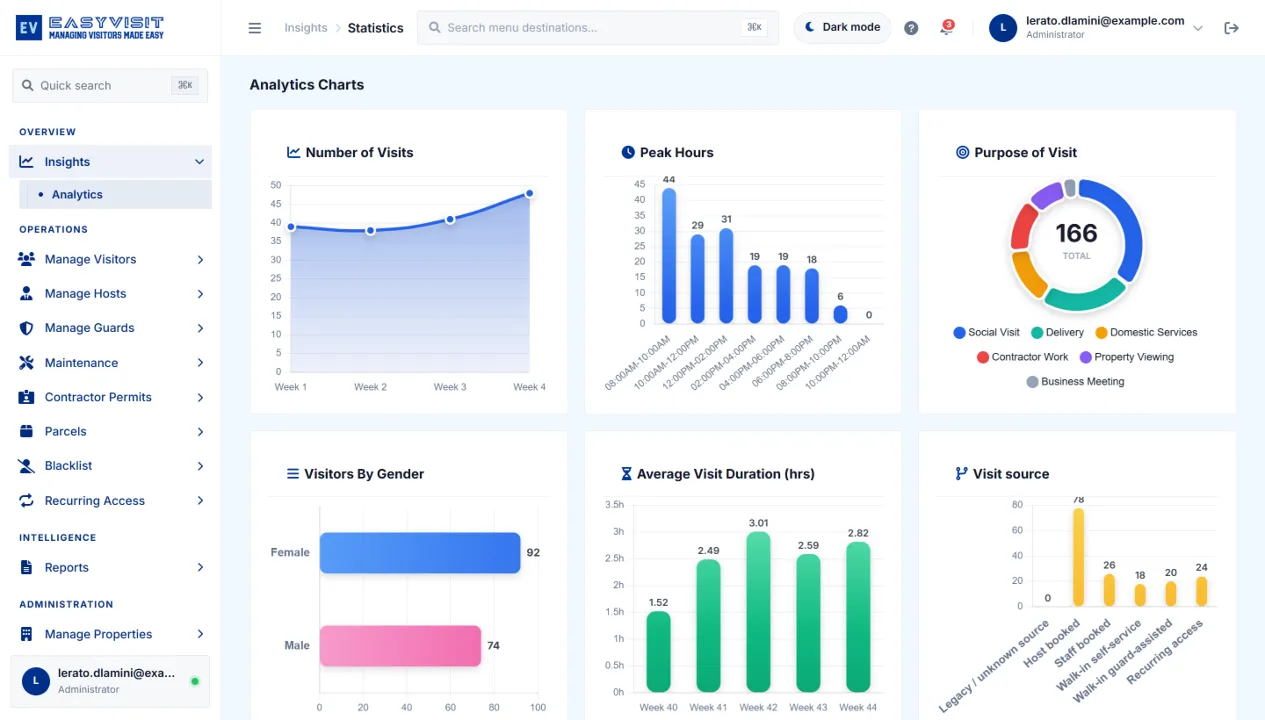
EasyVisit Insights dashboard with visit volumes and trends

Insights and analytics

See how your property is really used, filtered by property and date range.

  • Visit volumes and peak hours, week by week
  • Visit purpose, visitor mix and average length of stay
  • How visits were created: host-booked, staff-booked or walk-in
Portal

A portal for everyone at the gate.

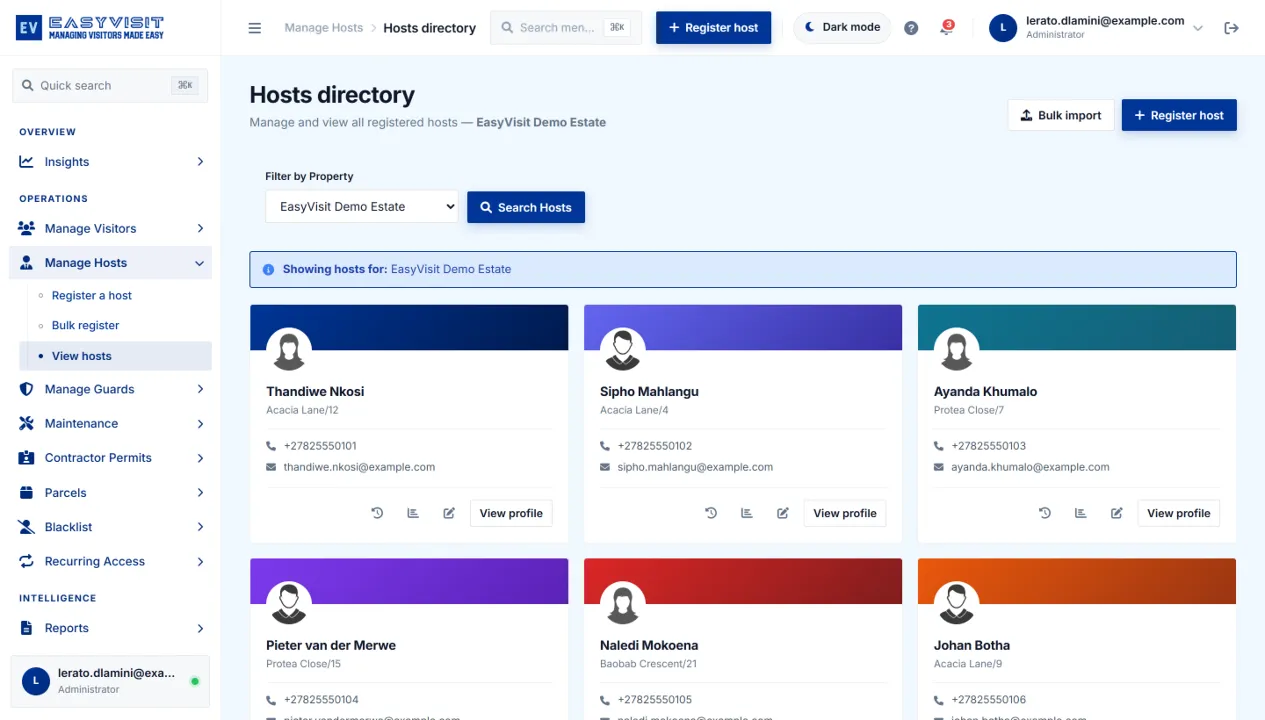
One web address routes hosts, visitors and guards to their own screens. Hosts book visits and approve walk-ins, visitors check in with their code, and guards run the live on-site list. Everything lands in the same record.

For hosts

Host portal

Book visits, track arrivals and manage parcels. Built for daily use.

For visitors

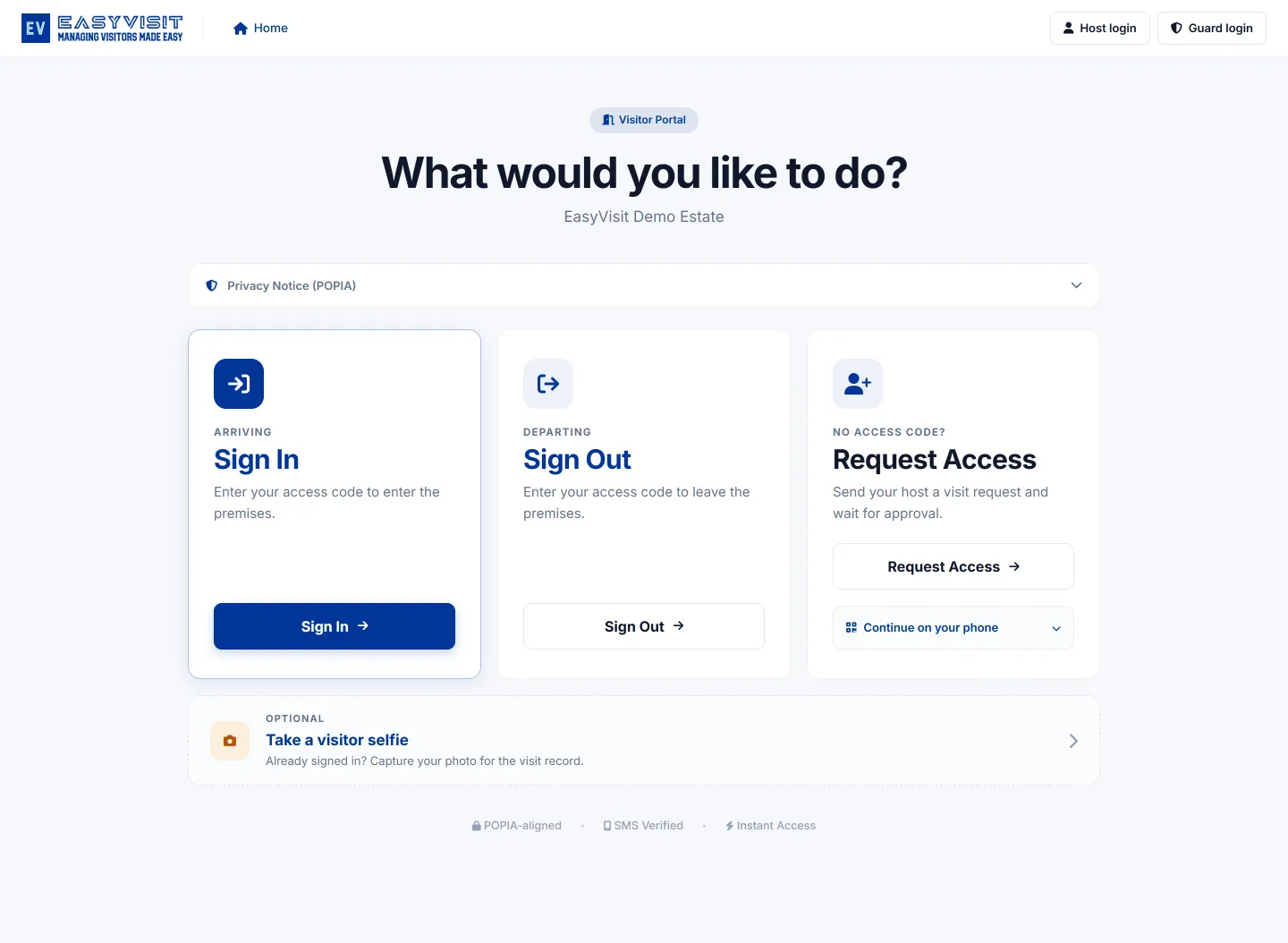
Visitor kiosk

Walk up, enter a code, sign in. Three big choices and no app.

For guards

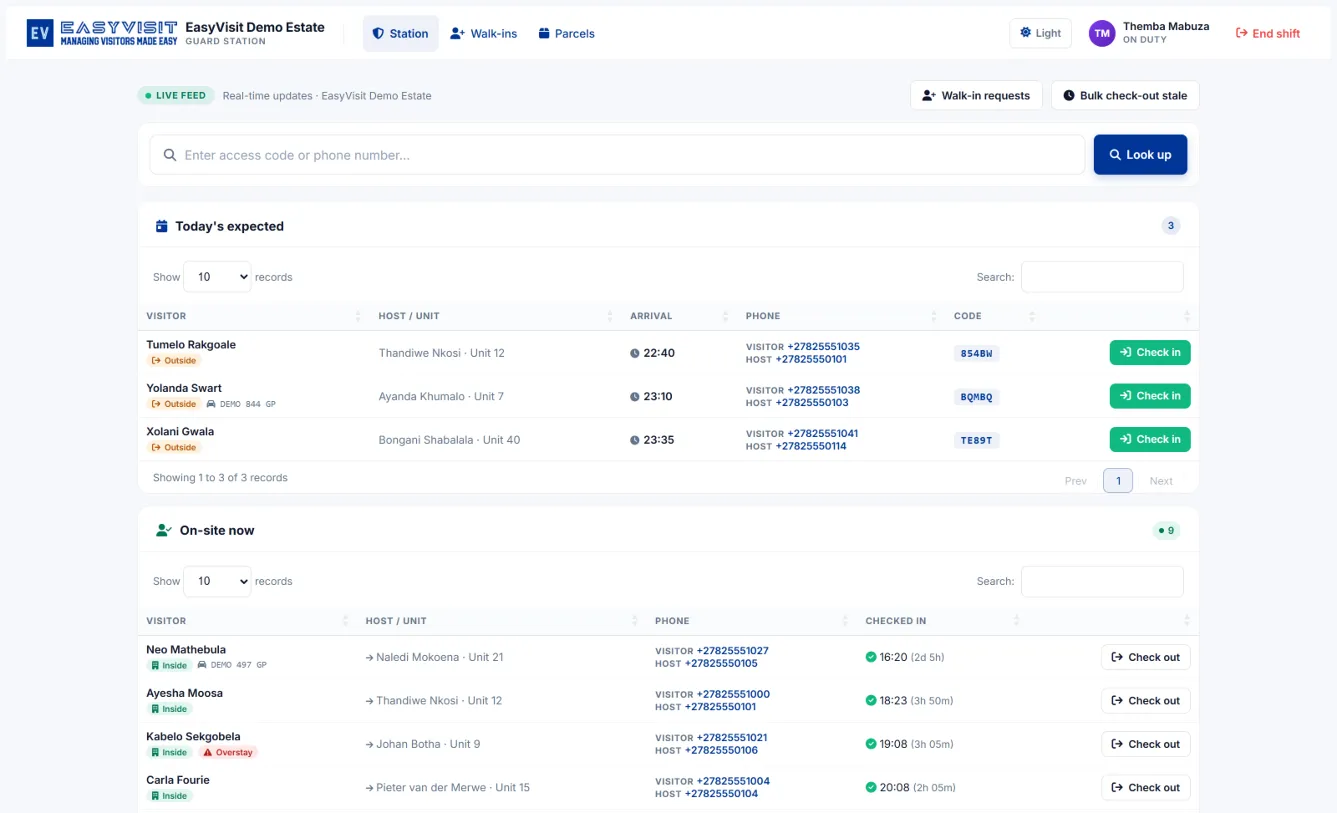
Guard station

Live feed, lookup and lockdown, with an optional dark mode for night shift.

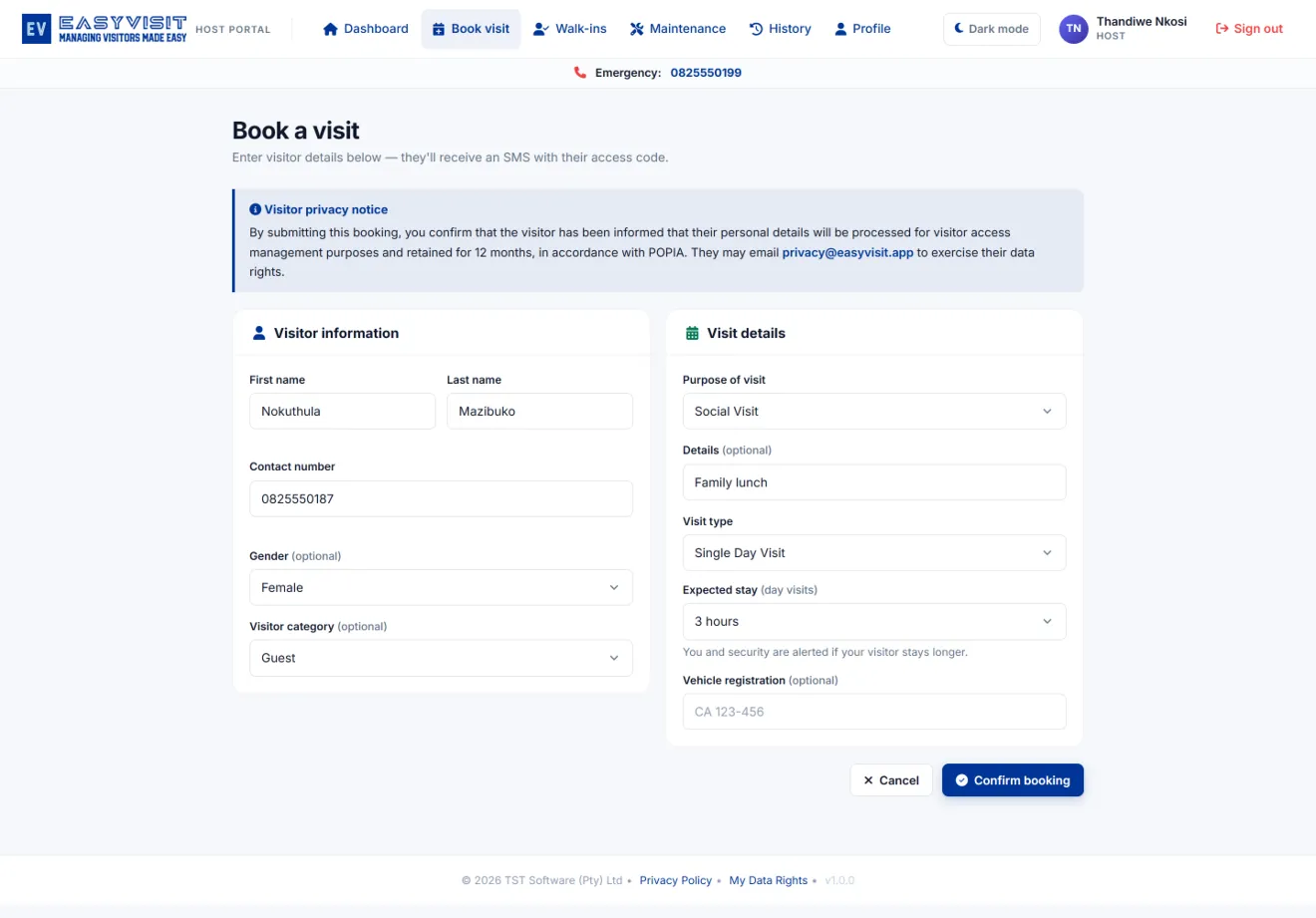
portal.easyvisit.app/Host/Book
Host Portal form for booking a visit

Book a visit

Hosts create a visit in seconds, on a phone or a computer, and the visitor goes straight into the access-code and alert flow.

  • Single-day, pre-scheduled, multi-day or long-term visits
  • Expected stay set at booking, so overstays are flagged
  • Vehicle registration captured for the guard
Features

The full security stack.

Every feature below is included on every plan. You choose a plan by property size, not by which features you need.

Walk-ins

Host-approved walk-ins

Visitors without a code don’t wait for an intercom call. Where a property enables walk-ins:

  1. The visitor scans the entrance QR code, or the guard submits the request for them.
  2. They verify their mobile number, and the host gets the request in the portal.
  3. The host approves and a same-day access code is issued. Unanswered requests expire after 15 minutes.
Overstays

Overstay alerts

Know when a visitor should have left, without anyone watching the clock.

  1. The host sets the expected stay when booking, or the property’s default applies.
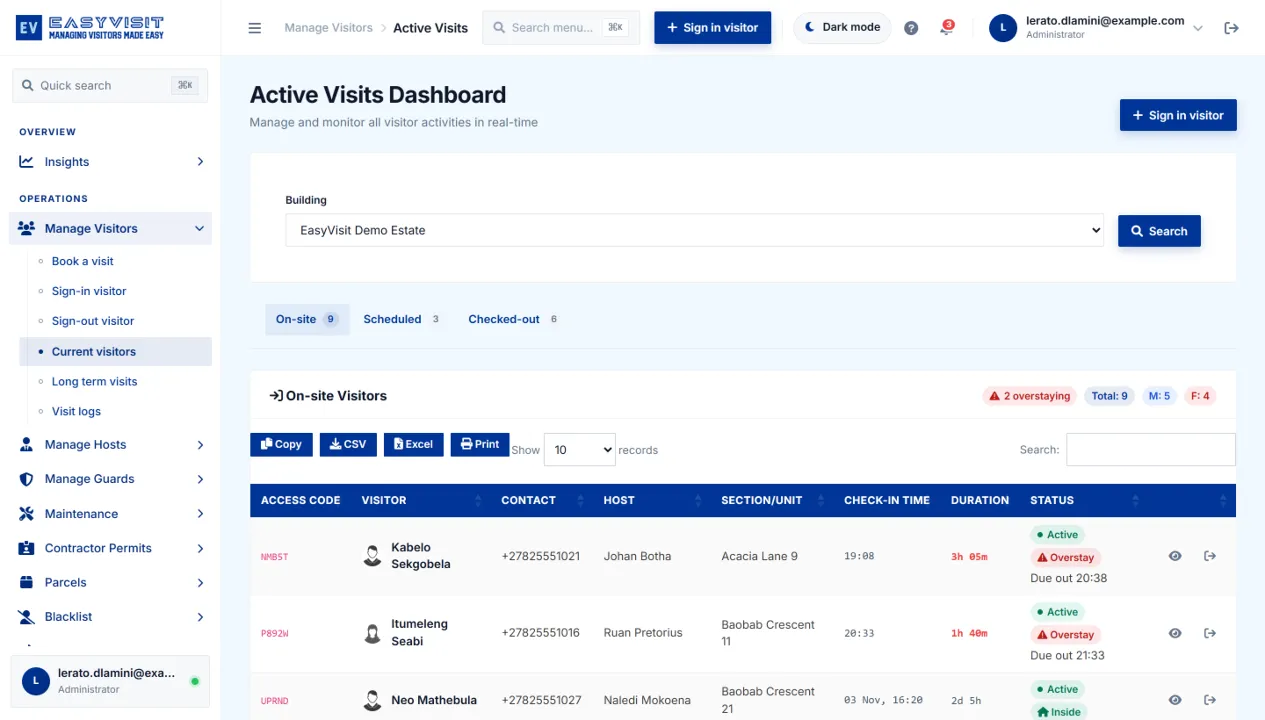
  2. Once a visitor passes their expected departure, the host gets an SMS and the guard station shows an alert.
  3. Overstays are flagged on the dashboard home, the on-site list and the overstay chart.
Contractors

Contractor permits

Contractors get access for the job, not indefinitely.

  1. Issue a time-limited permit with the contractor’s access window.
  2. Record the expiry date of their insurance certificate.
  3. The dashboard flags permits awaiting approval and insurance expiring within 30 days.

Visitor screening

Optional photo capture and watchlist cross-referencing on every check-in, with a searchable digital record of every entry.

SMS and WhatsApp sharing

Hosts get arrival notifications. Visitors receive a 6-character access code on their phone, and hosts can share booking details from the portal.

Live dashboard

See who is on site, who is expected and who was flagged, in real time.

Watchlist and blacklist

Flag individuals by phone number, email address or ID number. Bookings and kiosk check-ins for them are refused, and a guard at the gate can admit them only with a recorded reason.

Deep analytics

Peak hours, visit-purpose breakdown and no-show rates, filterable by date range.

Emergency lockdown and roster

Lock the property in one tap: no new check-ins until you lift it. Pull an instant list of everyone on site for roll call.

Vehicle tracking

Record registration numbers at booking. Guards verify the car before opening the gate.

Parcel management

Log deliveries at the gate, SMS the resident instantly and track collection.

Maintenance requests

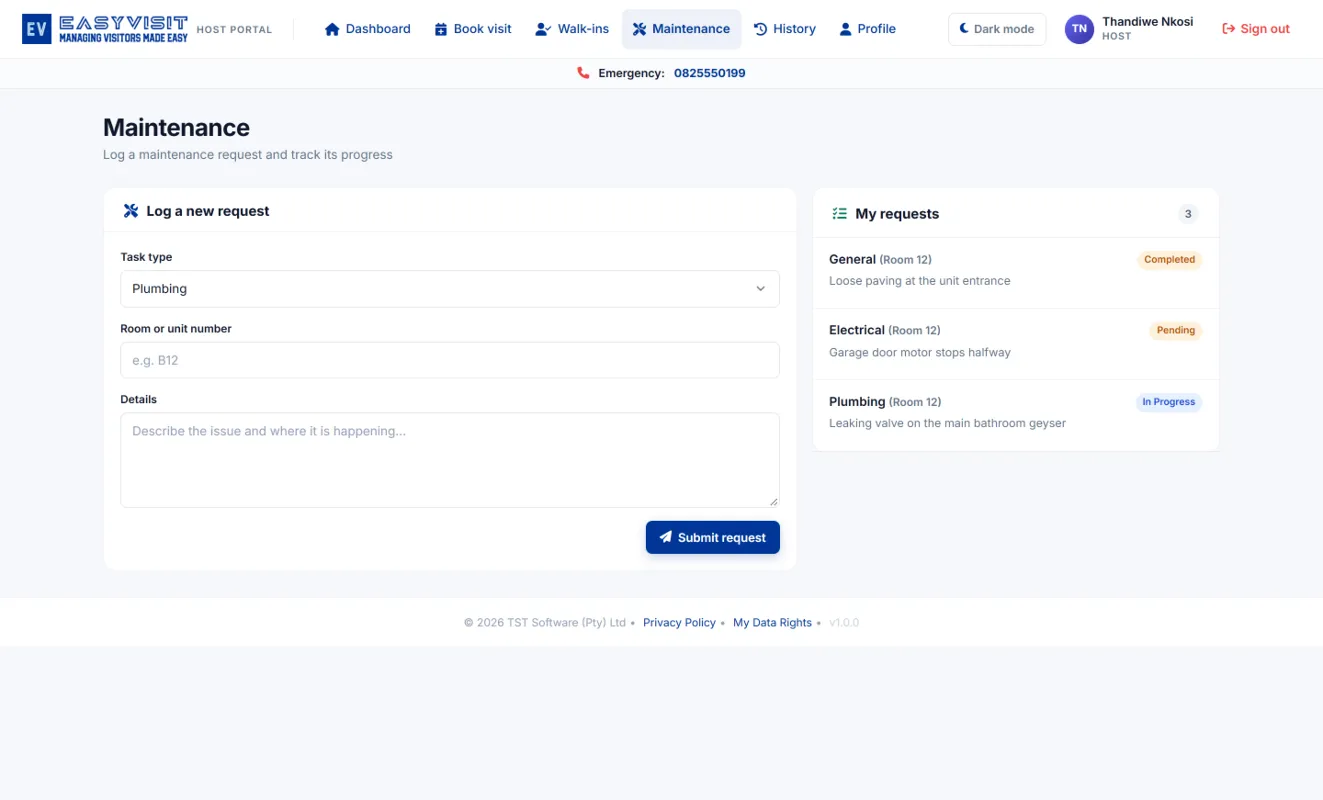
Residents log plumbing, electrical and general issues in the portal. Managers track each one from pending to completed.

Who it's for

One platform. Every property type.

ESTATES

Residential estates

Boom gate is the first line of defence. Know who guards are letting in — and stop the rest.

  • Guest codes
  • Watchlist screening
  • Resident SMS
  • Contractor permits
  • Maintenance requests
Visitor management for estates
CORPORATE

Offices & co-working

Reception handles dozens daily. Log everyone, notify hosts, keep a clean visitor record.

  • Host-approved walk-in requests
  • Pre-scheduled access codes
  • Host SMS on arrival
  • Compliance exports
  • Facilities requests
Visitor management for offices
INDUSTRIAL

Warehouses & logistics

Contractors, drivers, inspectors — multi-week permits with timestamped audit trail.

  • Long-term permits
  • Multi-property dashboard
  • Entry/exit audit
  • Delivery driver check-in
  • Searchable history
Visitor management for logistics
Getting started

From sign-up to your first visitor.

No special hardware and no app to install. We set your property up with you.

  1. We set up your property

    We create your organisation and property, with your visit reasons and walk-in settings.

  2. Add your hosts

    Import residents or staff in bulk, or add them one at a time. Hosts sign in with an SMS code, so there are no passwords to manage.

  3. Set up the gate

    Open the guard station and visitor kiosk in the browser on a tablet or PC, and print the property’s QR code for walk-ins.

  4. Go live

    We check the first booking, check-in and check-out with you before you switch over from the visitor book.

POPIA by default

Data minimisation, automatic retention limits, and a watchlist kept separate for each property — not features you toggle on later, but the foundation we built on first.

South African support

Real people, same time zone, same context. Mon–Fri 08:00–17:00 SAST. WhatsApp-first because that's how business works in SA.

No per-visitor pricing

You pay for your property size, not for how many visitors show up. A busy December shouldn't double your bill. Every feature, every tier — no asterisks.

Pricing

One price. Every feature.
Per property.

No hidden fees and no lock-in. Every feature on every plan, priced by the size of your property. A once-off setup fee covers your visitor kiosk and guard station.

MICRO
1 – 30 units
R899/mo
Billed monthly
1,500 SMS / month
  • All features included
  • Unlimited hosts
  • POPIA-aligned controls
SMALL
31 – 75 units
R1,699/mo
Billed monthly
3,750 SMS / month
  • All features included
  • Unlimited hosts
  • POPIA-aligned controls
PROFESSIONAL
151 – 300 units
R4,999/mo
Billed monthly
15,000 SMS / month
  • All features included
  • Multi-building support
  • Full visit audit trail
LARGE ESTATE
301 – 600 units
R8,999/mo
Billed monthly
30,000 SMS / month
  • All features included
  • Estate-scale analytics
  • POPIA-aligned controls
ENTERPRISE
601 – 1,200 units
R14,999/mo
Billed monthly
60,000 SMS / month
  • All features included
  • Enterprise-grade support
  • POPIA-aligned controls
Several properties? 10% off for 2–3 properties, 20% off for 4–10 and 30% off for 11–25.
More than 1,200 units? Campus pricing is quoted to fit your scale. Chat on WhatsApp
Build your quote Set your unit count, properties and billing cycle to see your plan and total.
50
1–30 31–75 76–150 151–300 301–600 601–1,200
1
1
Recommended plan
Small
31 – 75 units
Price per propertyR 1,699 / mo
SMS included3,750 / mo
Total (monthly) R 1,699

Billed monthly. Excludes the once-off setup fee.

FAQ

Questions buyers ask us.

Can’t find yours? Chat on WhatsApp or request a demo.

Do we need special hardware?

No. The guard station, visitor kiosk, host portal and dashboard all run in a modern web browser, so a tablet or PC at the gate is enough. Optional visitor photos use the device’s camera.

Do visitors need a smartphone or an app?

No app is needed. Pre-booked visitors receive their access code by SMS, which works on any mobile phone. Where a property enables walk-ins, visitors without a code can request access at the kiosk, through the guard or by scanning the property’s QR code on their own phone.

What happens if the gate loses internet?

EasyVisit is cloud software, so the device at the gate needs a connection. Wi-Fi and mobile data both work, so a mobile-data backup on the gate tablet keeps check-ins running if the property’s line goes down.

What counts as a unit?

A unit is a home, apartment or tenancy at the property: the places your hosts live or work. Plans are priced per property by unit count, and every plan includes every feature. If your site isn’t divided into units, such as a single-company office or warehouse, chat to us and we’ll recommend the right plan.

What if we send more SMS than our plan includes?

Each plan includes a monthly SMS allowance, and the allowances of all your properties are pooled. Every SMS counts once: visitor access codes, host alerts, host and guard sign-in codes and other notifications. SMS above the pool cost R 0.30 each (excluding VAT) on your next invoice. We email you when 80% is used and again when it runs out, and your dashboard shows usage by property and host. See our Terms.

Is there a setup fee?

Yes. A once-off setup fee covers setting up your property, the visitor kiosk and the guard station. We include it in your quote, alongside your monthly plan.

Can we cancel?

Yes. Plans are billed monthly in advance, and either side can end the agreement with 30 days’ written notice.

Who owns our visitor data?

You do. EasyVisit processes visitor data on your behalf. You can export visit records, contractor permits, parcels and maintenance requests from the dashboard as CSV or Excel at any time. Visit records are deleted automatically 12 months after each visit, and visitor photos once the visitor has not visited for 90 days; see our Data Retention Policy. If you leave, export what you need before your notice period ends; you can ask privacy@easyvisit.app to remove any other data.

Where is our data stored?

Outside South Africa. The EasyVisit database is hosted by Cloudclusters in the central United States, the application runs on Hetzner servers in Finland, and optional visitor photos and documents are stored with Dropbox. Application logs are kept in Amazon Web Services in Cape Town. Our Privacy Policy explains who we share information with.

How does EasyVisit support POPIA?

The kiosk shows a privacy notice, every SMS that gives a visitor an access code links to the privacy policy, visit records are deleted automatically after 12 months, and visitors can send a data request through the portal. Our POPIA statement explains how we process personal information.

Does it connect to our boom gate or access control system?

EasyVisit runs alongside your existing gate: guards check visitors in on the guard station and open the boom as they do today. Integration with access-control hardware can be scoped for your site; ask us about your setup.

Your next visitor is arriving in minutes.
Are you ready?

Go paperless from day one. No clipboards, no visitor books, no radio calls — ever again. Book a 20-minute walkthrough and see exactly how check-ins work after you switch.

Chat on WhatsApp
We call within 1 business day No obligation Mon–Fri 08:00–17:00 SAST